Media player
When enabled, this configuration displays a media player widget above or alongside the navbar. You can configure one or multiple players; with multiple players, a carousel appears with dot indicators and swipe/drag to switch between them. The widget is shown when any configured player is playing or paused (or when a custom show template evaluates to true).
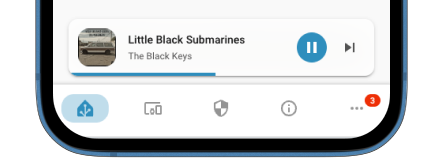
Widget-level options
| Option | Type | Default | Description |
|---|---|---|---|
players | array | - | List of media player configurations. Each player has its own entity and optional overrides. |
show | boolean | JSTemplate | - | Widget-level visibility. When set, overrides per-player visibility for the whole widget. |
album_cover_background | boolean | false | Display the album cover as blurred background for all players |
desktop_position | top-left | top-center | top-right | bottom-left | bottom-center | bottom-right | bottom-center | Position of the media player widget on desktop. On mobile, the widget is always displayed at the bottom of the view. |
Per-player options
Each item in players supports:
| Option | Type | Default | Description |
|---|---|---|---|
entity | string | JSTemplate | - | Entity ID of the media_player (required) |
show | boolean | JSTemplate | true when playing or paused | Per-player visibility. When configured, this player is shown when the template evaluates to true. |
icon | string | JSTemplate | mdi:music (or album cover) | Icon to display. If configured, overrides the album cover image. |
title | string | JSTemplate | media_title attribute | Title text displayed in the media player. |
subtitle | string | JSTemplate | media_artist attribute | Subtitle text displayed in the media player. |
tap_action | HA Action | more-info for entity | Tap action for this player. |
hold_action | HA Action | - | Hold action for this player. |
double_tap_action | HA Action | - | Double tap action for this player. |
Examples
Single player
type: custom:navbar-card
# ...
media_player:
  album_cover_background: true
  players:
    - entity: media_player.living_room
      tap_action:
        action: navigate
        navigation_path: /lovelace/media
Multiple players (carousel)
media_player:
  album_cover_background: true
  players:
    - entity: media_player.spotify
    - entity: media_player.sonos
      icon: mdi:speaker
    - entity: media_player.kitchen
Dynamic entity with template
media_player:
  album_cover_background: true
  players:
    - entity: |
        [[[
          const state = states['sensor.area_select'].state;
          switch (state) {
            case 'Office': return 'media_player.office';
            case 'Kitchen': return 'media_player.kitchen';
            case 'Main bedroom': return 'media_player.main_bedroom';
            case 'Living room': return 'media_player.living_room';
            default: return 'media_player.whole_home';
          }
        ]]]
      tap_action:
        action: navigate
        navigation_path: /lovelace/media
      hold_action:
        action: more-info
Widget-level show (hide entire widget)
media_player:
  players:
    - entity: media_player.test_media_player
  show: "[[[ return !navbar.isDesktop ]]]"  # Only on mobile
  desktop_position: bottom-right
Per-player show (filter which players appear)
media_player:
  players:
    - entity: media_player.spotify
      show: "[[[ return states['media_player.spotify'].state == 'playing' ]]]"
    - entity: media_player.sonos
      show: "[[[ return states['media_player.sonos'].state == 'playing' ]]]"